
Shutdown, Restart, Reset
When something isn’t working, do the least aggressive thing that solves the problem.
Most ICATS issues are fixed by a proper shutdown or restart. Hard power removal should be rare.
Removing power without a proper shutdown can corrupt the SD card and prevent ICATS from booting.
This is the most common cause of serious system failures.
Normal shutdown (preferred)
Use this whenever ICATS is responsive.
- Open the Quit menu
Right-click on an empty area of the table to open the main menu.
- Shut down ICATS
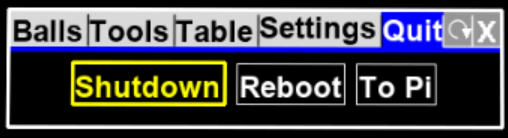
Select Quit → Shutdown.
- Wait for shutdown to complete
Wait about 10 seconds until the green LED stops flashing.
- Remove power (optional)
Once the green LED has stopped, it is safe to turn off or unplug power.
If you don’t plan to move the system, it is fine to leave ICATS powered but shut down.
Restart (use if something is stuck)
Use a restart if:
- The UI is frozen
- A projector or input device didn’t initialize correctly
- The display is incorrect after a layout change
- Attempt a normal shutdown first
Follow the steps above if the menus are still responsive.
- Cycle power
After shutdown completes, turn power off, wait 5 seconds, then turn power back on.
After restart, ICATS will load the last drill you were using.
Forced power-off (last resort)
Only use this if:
- The screen is completely frozen
- Menus will not open
- The system does not respond to input
Forced power-off increases the risk of SD card corruption.
Do not make this a habit.
- Remove power
Turn off or unplug power without using the shutdown menu.
- Wait before restoring power
Leave power off for at least 10 seconds.
- Restart and observe
Restore power and watch the boot process carefully.
If forced power-off is needed repeatedly, something else is wrong (see below).
If problems keep happening
Repeated freezes or failed boots usually indicate:
- Improper projector mounting or alignment
- Unstable power
- Overheating
- Corrupted SD card
At that point:
- Stop forcing restarts
- Document what you’re seeing
- Contact ICA support with details